

MYR TITAN EQ
ANALOG DYNAMIC EQ
An equalizer with twenty-four bands, and every one of them can be made dynamic: the band then only moves when that frequency actually gets too loud, and leaves the rest of the track alone. Three filter modes decide the trade-off, from an analog curve with no latency at all to perfectly linear phase.
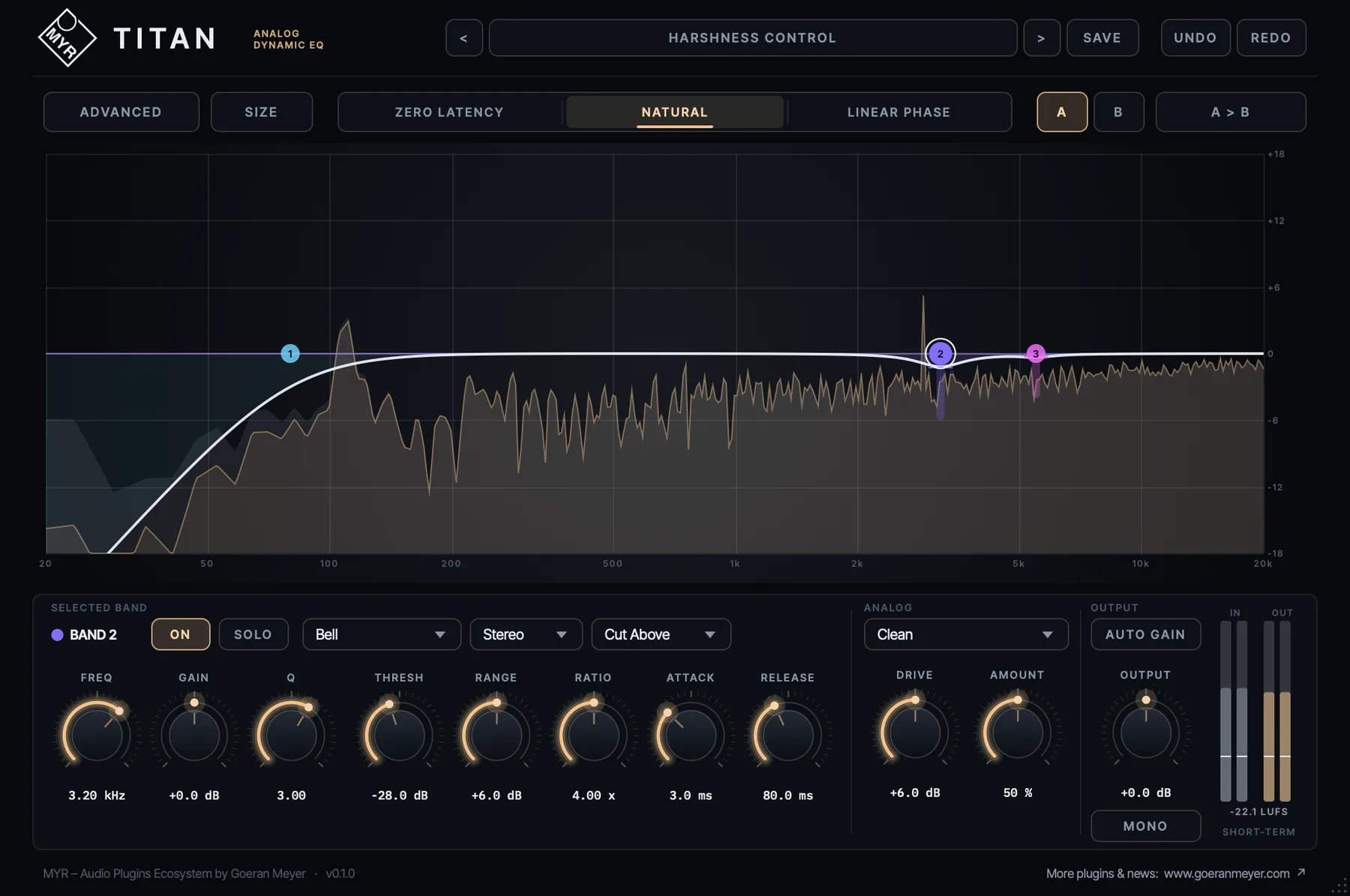
Key features of the free dynamic EQ
- ZERO LATENCY
- NATURAL
- LINEAR PHASE
- 24 bands, 9 filter types
- Every band can work dynamically, with internal or external sidechain
- Slopes from 6 to 96 dB per octave
- Stereo, left, right, mid or side per band
- Tube, transformer, vintage and mix bus colour
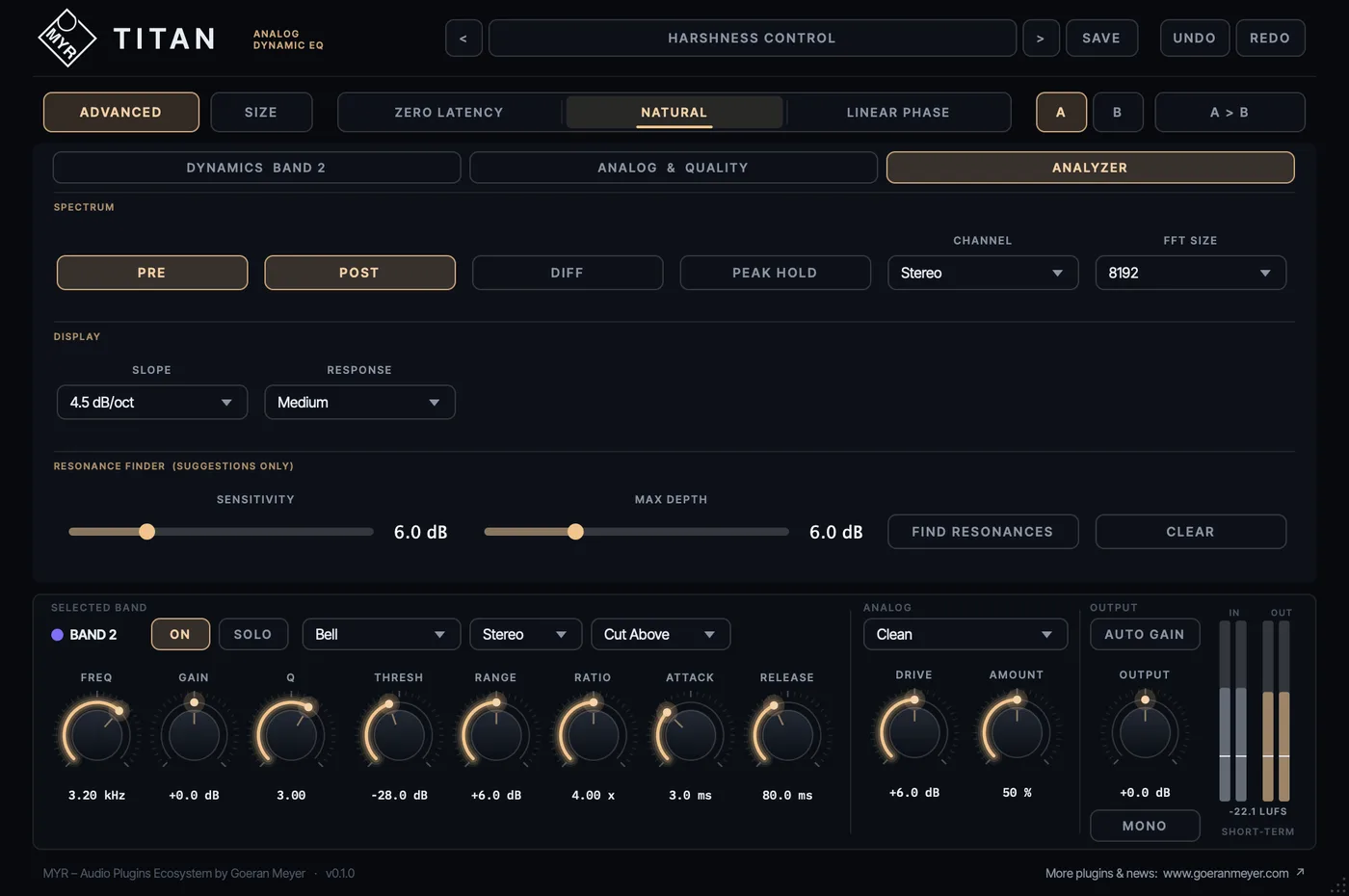
- Analyzer with resonance finder and note names
- Sweep: a narrow bell follows the mouse, listen before you cut
- LINK: two TITAN tracks see each other and duck each other
- Auto gain, loudness metering and a mono check
Information
- MACOS
- VST3 and Audio Unit (AU) · macOS 11 or newer · Universal (Apple Silicon & Intel)
- WINDOWS
- VST3 · Windows 10 or newer · 64-bit
- PRESETS
- 30 factory presets in 6 categories
- VERSION
- 0.2.0 · package 0.8.1 · October 2026
- INSTALLER
- MYR-Installer-0.8.1.pkg · MYR-Installer-0.8.1.exe
- MANUAL
- Illustrated 8-page tutorial, English and German
- PRICE
- Free, no account and no licence key
Inside the download
- Installer for your system (PKG / EXE)
- All five plugins, every format your system supports
- Illustrated tutorial, English and German
- Preset overview as a printable page
- Raw plugin bundles for a manual install
What the update adds.
Already installed? The download below carries this version. Install over the old one, your presets and sessions stay where they are.
01
Note names everywhere
Every frequency read-out now also names the note and the deviation in cents, so 72 Hz reads as D2 −34 ct. Every C is marked along the bottom, the concert pitch can be set to 432, 440, 442 or 443 Hz, and holding CMD or CTRL while dragging snaps a band to the nearest semitone. Useful when the kick should sit on the root of the song rather than near it.
02
Sweep: hear it before you cut it
Switch on SWEEP, then press and drag in the graph. A narrow bell follows the mouse, the vertical position sets boost or cut, the wheel sets the width, and holding ALT leaves only that band audible. Let go and TITAN offers what to do with what you just heard: a cut, a notch, a dynamic cut, or nothing at all. With SWEEP off the output is bit-identical to the input.
03
LINK: two tracks that see each other
Put TITAN on the kick and on the bass, then click COMPARE in the bass instance and pick the kick. Its spectrum, its EQ curve and its bands appear in blue, and the frequencies where both tracks are loud at once are marked red. A right-click mirrors a cut, or ducks the bass only while the kick plays. Works across instances in the same project and the same format.
The advanced panel
Everything on one surface, nothing buried in menus. The advanced panel opens the second layer of MYR TITAN: the controls you reach for once the sound is close and wants shaping.
Fund the ecosystem.
MYR TITAN is free and stays free. There is no paid tier and no upgrade waiting behind it. If it earns its place in your sessions, a donation keeps the work going and pays for the next plugin in the family. We really appreciate every bit of support, and we are just as glad to hear what you think.
Handled entirely by PayPal. You choose the amount there, and no payment details are entered on this site.
Read first, install second.
The manual covers installation on both systems, the rescan in your DAW, every control and the factory presets. Free to read as a page before you download anything, or as a PDF in English and German.